Documentation · Settings, plan and data
What we believe and how we sound
Set your tradition, your Bible translation, a few points from your statement of faith, and how your church sounds. Every AI draft then uses them, and cites Scripture by reference only.
For: PastorAdminOwner
See this screen in the demo church
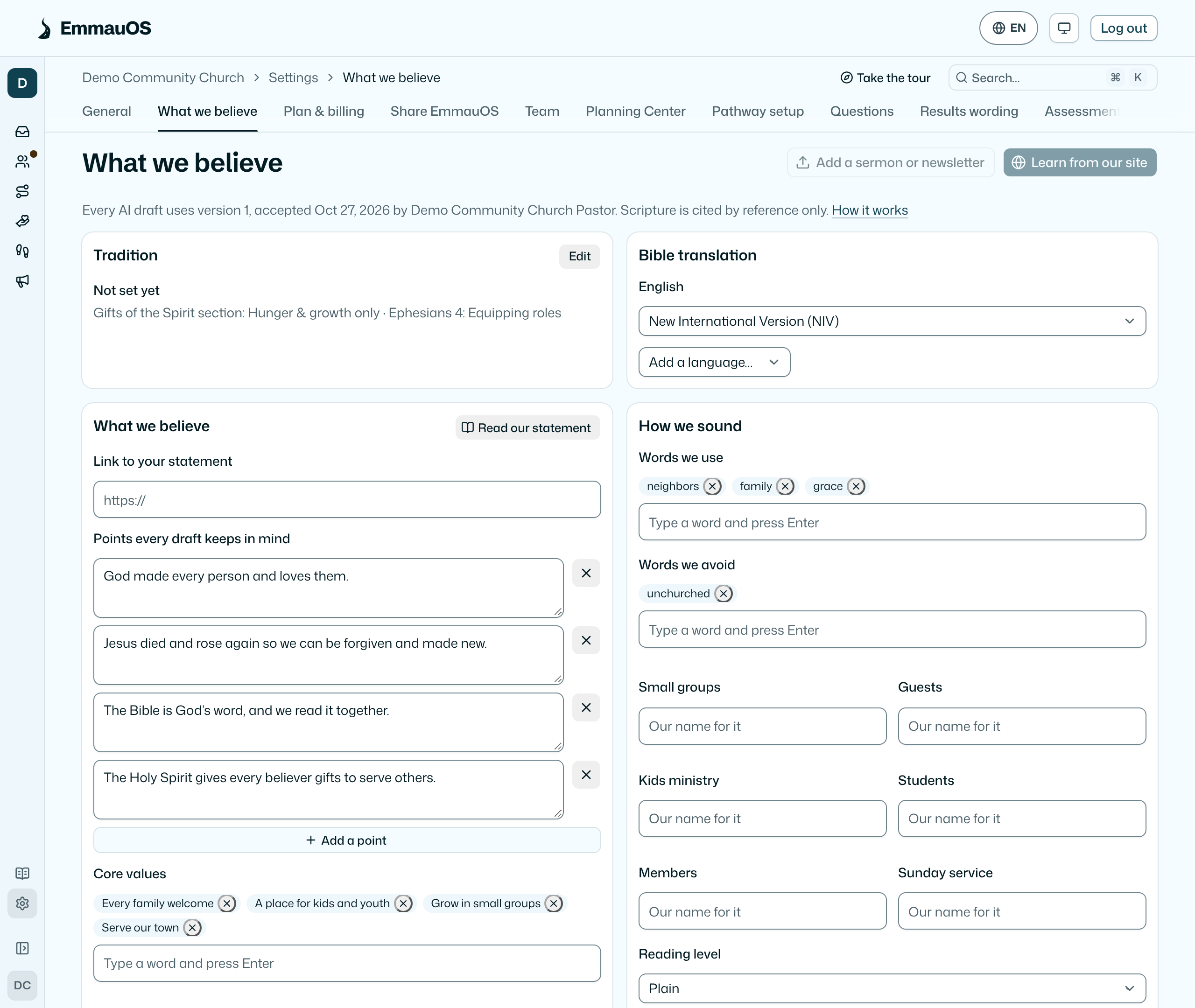
Open Settings → Connections → What we believe. One page, four cards. Everything on it can be set by hand, with no AI.
Tradition
The tradition closest to yours, and how your results talk about gifts: the Gifts of the Spirit section, Ephesians 4, and prophetic language. This used to sit under Settings → General. It changes how results are presented, never the scoring.
Bible translation
Choose your house translation for each language your church uses, or choose Other and type its name. Drafts name it beside a reference when the words are for your people.
What we believe
Link your statement of faith, or press Read our statement and paste it. EmmauOS keeps a handful of short points in mind when it drafts. Edit any point, remove it, or add your own. With your church's AI on, each suggested point is shown beside the words of your statement it came from. Without it, each paragraph you paste becomes a point to edit.
The points are a summary for drafting, not a public statement of faith. Your own statement stays the authority, and EmmauOS never decides doctrine.
How we sound
- Words we use and words we avoid, as chips. Type a word and press Enter.
- Your names for things: small groups, guests, kids ministry, students, members, the Sunday service.
- Reading level, warmth (formal to warm), and whether you speak as we or to you.
- Lines of ours: a few short lines that show your tone.
Hear it drafts two sample sentences in the voice, so you can judge it before you save or accept.
Learn from your site, sermons and newsletters
Learn from our site reads up to eight pages of your own website: the home page, then pages about who you are, what you believe, visiting, and recent posts. Add a sermon or newsletter takes pasted text or a file (.txt, .md, .html or .docx). Both need your church's AI key.
Learning returns a draft. Review shows each suggestion beside the short quote it came from. Leave out anything that isn't you, then Accept. A suggestion EmmauOS can't show with a quote from what it read is dropped. Until someone accepts, nothing changes.
What was read is not kept. EmmauOS keeps the profile, your short sample lines, and the addresses or file names it read, with when. The quotes shown beside a draft are cleared once it is accepted or dismissed. Sermons can name people, so check the sample lines and remove any you'd rather not keep.
Who does what
- Pastors see the page, run Learn and Read our statement, and draft with their own AI. Their drafts wait.
- Admins and owners edit by hand, accept or dismiss drafts, restore an earlier version, and delete one that isn't in use.
Versions
Each save or accepted draft is a new version. Earlier versions lists them with who accepted each and when. Restore brings one back as the newest version.
Where it's used
Every draft EmmauOS makes on your church's AI starts from this page: AI briefs, ministry wording, the pathway drafted from your words, and notes members ask help writing. Ask AI and briefs are for staff, so they use your beliefs and translation but not your public voice. A member's note keeps their own voice and only follows your translation and the Scripture rule.
Scripture by reference
Every draft cites Scripture by book, chapter and verse, such as Romans 12:6, and never quotes the text. A check after each draft takes out a quotation that sits beside a reference and keeps the reference. A verse someone quoted in their own words stays theirs. This respects translation licences and keeps quotations accurate.
Your own AI
Your assistant can read your site, sermons and statement with its own connectors and draft for you: get-voice, draft-voice and draft-beliefs. Its drafts wait here too. See Set up with your AI.
The profile shapes wording only. It never changes scoring, bands, or who is suggested for anything. No member's data, results or notes go into it.
Try it on your own church
Your assessment link works the minute you sign up. The first 50 people are free, and there is no card to enter.
This page as Markdown, for notes or an AI assistant.