Documentation · People and follow-up
People
Everyone in one list, filtered by gift, what they took, availability and status, with who follows up, bulk actions and a print view. Each person's results live on their page.
For: Everyone on the team
See this screen in the demo church
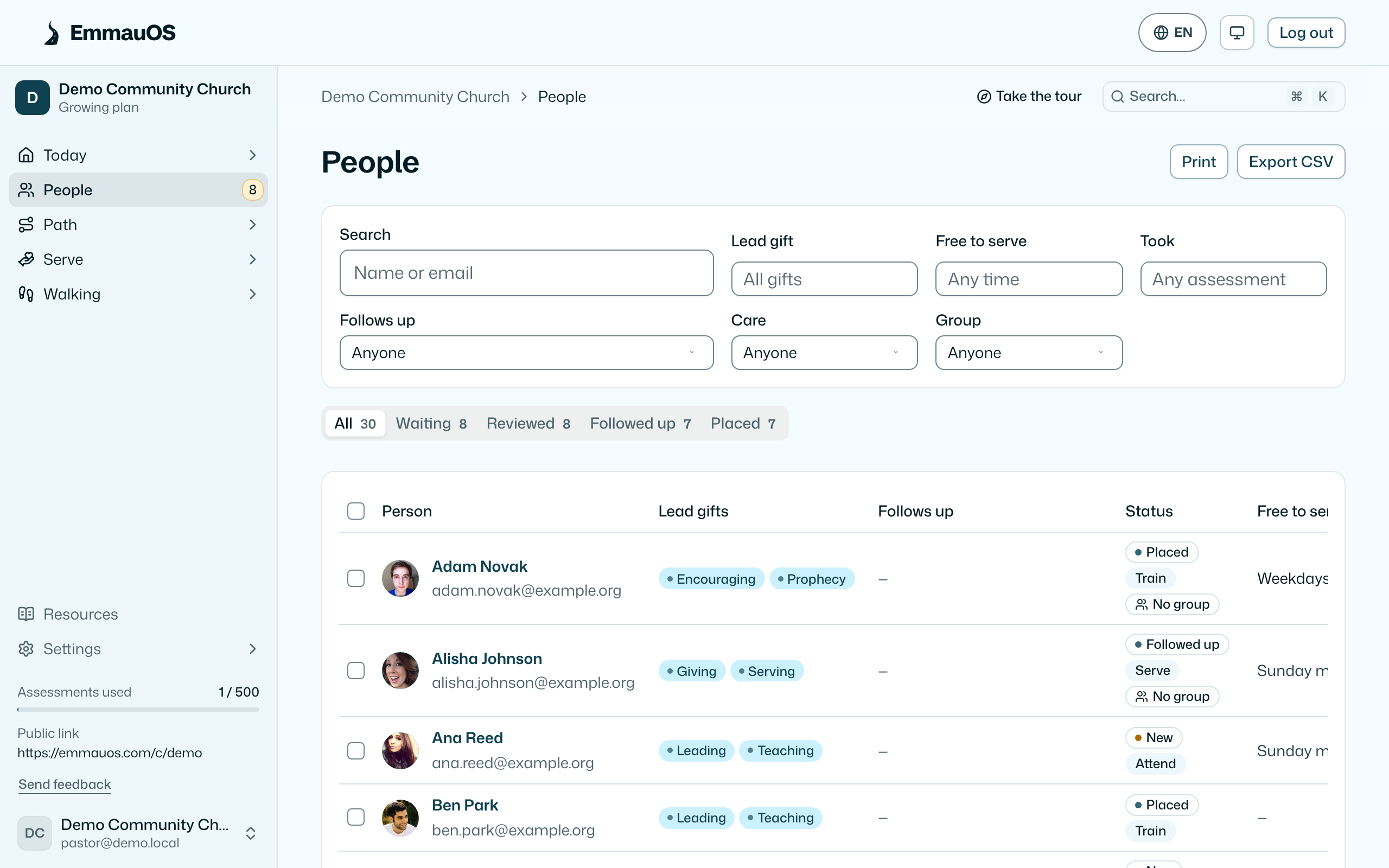
People
One row per person: name, lead gifts, whether they are free to serve, their follow-up status, who follows up, and when they last took the assessment. Open a row for the person's page.
- Search by name, and filter by status with the tabs along the top: waiting, reviewed, followed up, placed. Waiting is the first-look queue: people whose newest result nobody has opened yet.
- Filters narrow by a gift in the lead band, availability, who follows up, and more. Filters apply as you change them.
- Took narrows by what someone has taken: the EmmauOS assessment, any other assessment you keep (APEST, SHAPE, your own), or Nothing yet.
- Time in church narrows to people who have been in your church under a year, 1 to 3 years, 3 to 10 years, or 10 years or more. It counts from the month they were added to Planning Center, the nearest record of when they came, and appears once Planning Center is connected. People without that date are left out of this filter, and the list says how many are not on file.
- Care narrows to people who may be drifting or are carrying a lot. Each shows a badge beside their status; hover it for the reasons. See Drifting and carrying a lot.
- Group narrows to people in no Planning Center group, or to those an open group fits. Someone in no group shows a No group pill; hover it for the groups that fit, the same ones their page lists. See Group finder.
- Select several and mark them, or choose who follows up, in one go.
- Print gives a clean list for a meeting.
Each person has a stage on your pathway, shown on their page and set there under Growth timeline. Moving someone forward is recorded as a threshold; see Walking with. The Map shows every stage at once.
A person is one person: someone who retakes the assessment next year appears once, with their newest result, and their earlier results on their timeline.
Results live on the person
Results are part of a person, so there is no separate list of them. Open someone and choose Gifts: every result they took is there, newest first, each with its status and a link to the full result with the conversation guide, the log and placing. Latest result at the top of their page opens the newest one. Opening a result is what counts as a first look, as before.
- Counts on the Overview and Signals open People narrowed to the people behind the count, with a chip that says what you're looking at. The other filters still apply; the × shows everyone again.
- A result without an email (someone who didn't give one, or a try) has no person record, so it shows in People as its own row, marked Result only, no email. It opens the result. Follow-up choices and bulk marks need a person, so it has no checkbox.
- Export CSV leaves out people who didn't agree to share with pastors. Hover the button to see how many.
- Old links to the Assessments list still work and open People with the same filter.
The badge on People in the sidebar is the number of results nobody has opened yet.
Who sees what
A viewer sees the counts on the Overview but not this list. Leaders and up see every person who shared their result with the pastoral team. Pastors, admins and the owner also see people who didn't share: they can open the result in the app, but those people are never named in exports, introductions, AI briefs or Planning Center.
Anyone who may be under 18 is shown to leaders as an id and a date, not a name, and every action on them is refused. See What EmmauOS never does.
Try it on your own church
Your assessment link works the minute you sign up. The first 50 people are free, and there is no card to enter.
This page as Markdown, for notes or an AI assistant.