Documentation · Signals and insight
Be found: your findability report
What people near you ask, how search and AI assistants answer, which questions your site does not answer yet, and what moved since last month. Checked once a month.
For: PastorAdminOwner
See this screen in the demo church
Where it is
Be found is the top of Reach → Where people come from in the menu, above each source people came through and the pages that brought them in. Reach shows once an admin turns on Outreach in Settings, and pastors and up see it. It is on paid plans.
This month
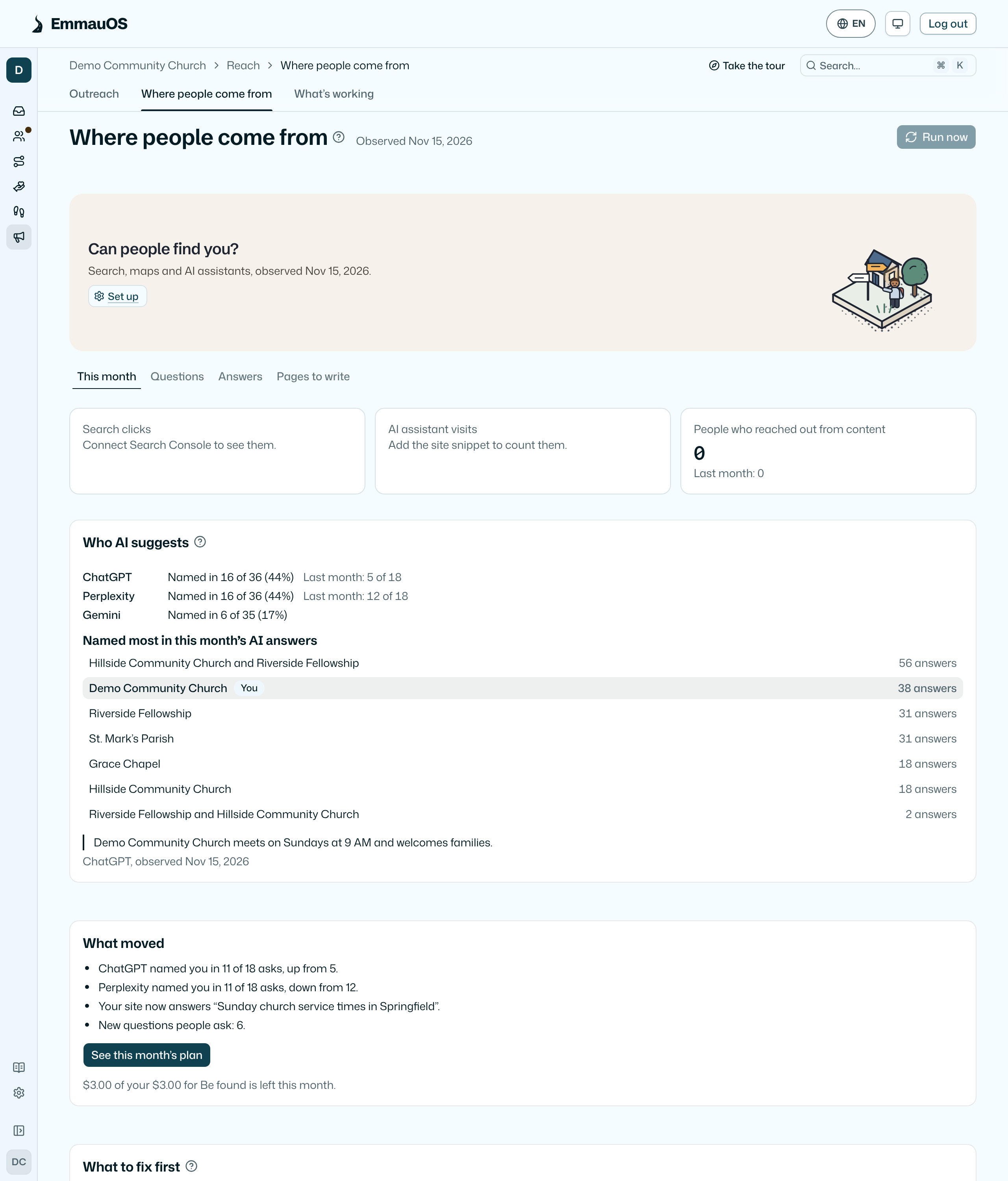
The first tab shows three numbers against last month: Search clicks (once Search Console is connected), AI assistant visits (once the site snippet is on your site) and People who reached out from content. A number that is not measured yet says how to start measuring it. Small counts show as "fewer than 5".
What moved lists up to five plain lines, such as "ChatGPT named you in 4 of 18 asks, up from 1" or "Your Google listing now shows service hours". The first month has nothing to compare, so it says your first comparison arrives next month.
Below that is the full report in four parts: listings, your site, search and AI assistants. Every line says Found, Partly, Not found or Could not check, what was observed, the date and the source. Start here lists up to five fixes in the order they matter most. Tick a fix when it is done; the team sees the same ticks. What the check looks at explains each line.
What to fix first lists this month's fixes in order, each with how long it takes (Quick, An afternoon or A project) and what showed it: a fact an assistant got wrong, a listing that differs, a name clash, missing structured data, thin ministry pages or the basics check. The first three join Pages to write.
Questions
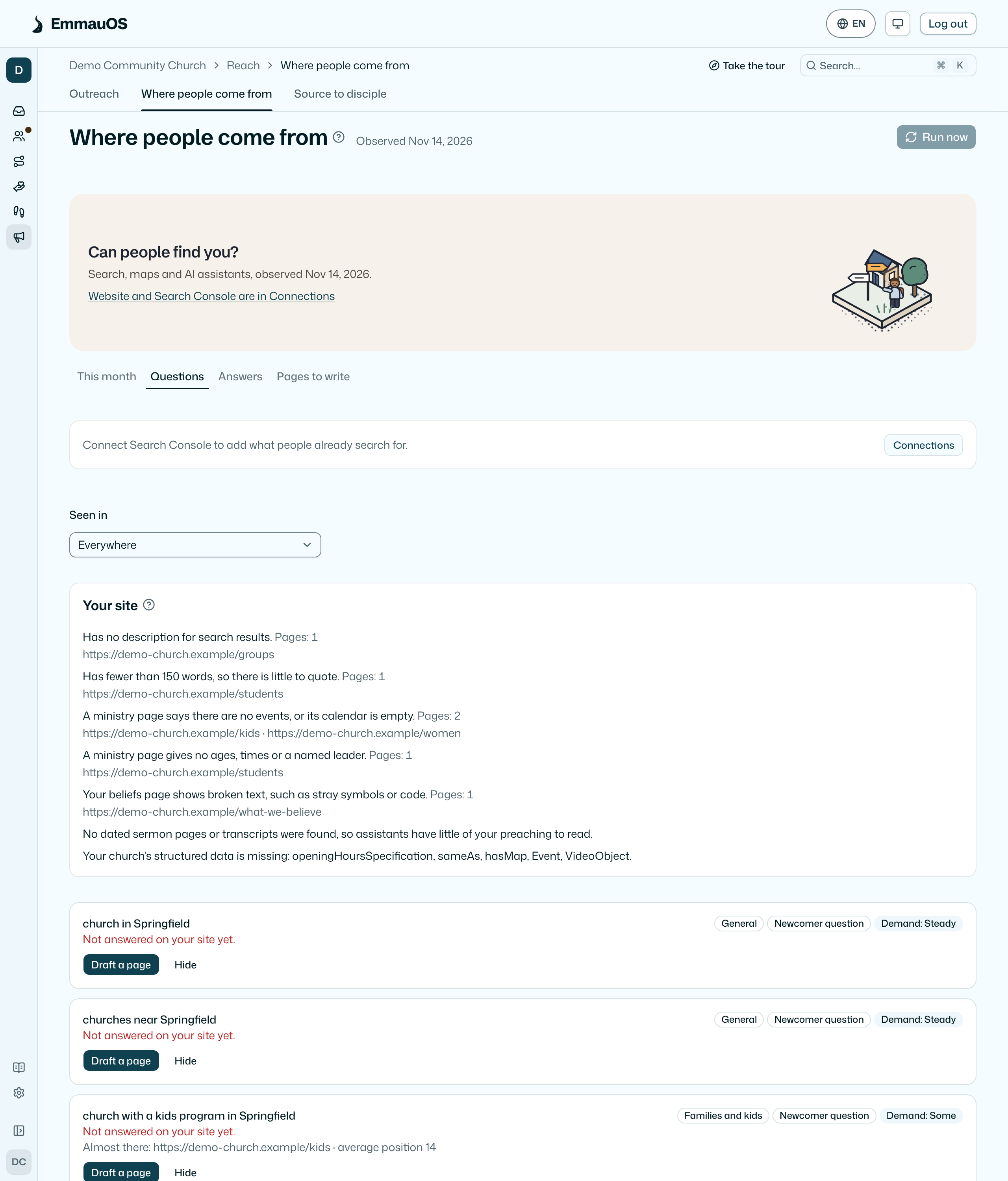
The questions people near you ask about a church, and where each one came from:
- Newcomer question: questions by what people are looking for (general, families and kids, beliefs, worship style, youth and students, new to town), two of each with your town in them, ordered by the ministries you run. They never name your church, so an answer that names you found you on its own.
- Search Console: what people already searched before they reached your site. Questions with your church's name in them are left out.
- Search suggestions: what search engines suggest as people type.
Each question says how often it is asked (Low, Some or Steady) and whether a page on your site answers it. Almost there names the page that nearly answers it. Draft a page adds it to Pages to write, and Hide takes a question off the list.
Your site checks the pages Be found read: titles, descriptions and headings, thin or slow pages, ministry pages that say there are no events or give no ages, times or leader, a beliefs page with broken text, whether there are dated sermon pages or transcripts, and which structured data fields your church is missing (address, telephone, opening hours, sameAs, map, events, videos).
Answers
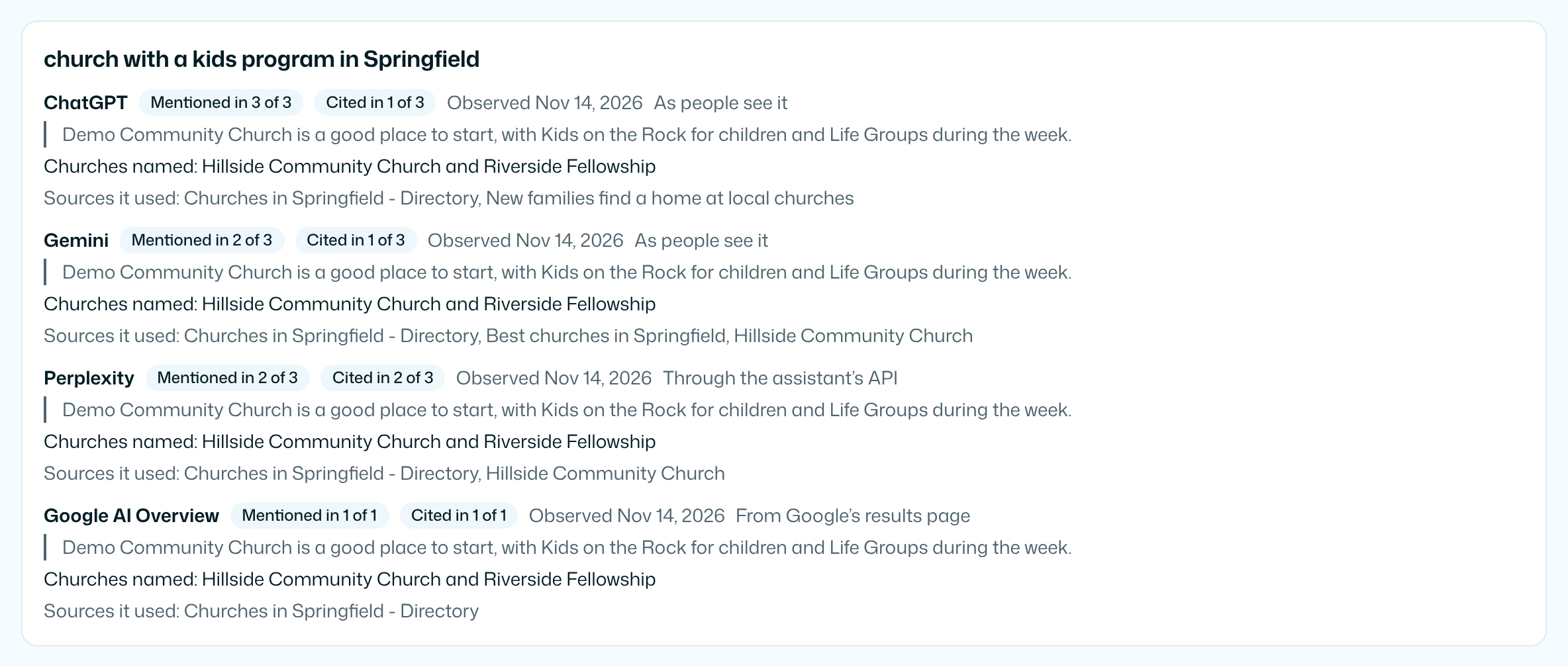
What Google and each AI assistant said when asked the same questions. Answers vary by person, place and day, so each assistant is asked each question several times (ChatGPT and Gemini five times, the others three), and the line says how many times it named you, such as "Named in 2 of 5". It quotes what was said, the other churches it named and the sources it used, with the date it was observed. How AI assistants find a church explains what they read.
Who AI suggests comes first. For each assistant it says how many of this month's answers named you, such as "Named in 9 of 60", beside last month's figure for the same questions. A percentage shows only from 10 answers; under that it says Small sample. Below are the churches this month's AI answers named most, with how many answers named each, and your church marked You, then one quote of how an assistant described you. There is no score.
Each answer is read two ways. Mentioned means it named your church or your web address in its words. Cited means it linked a page of your site as a source. An ask that got no answer says Not checked and is not counted. ChatGPT and Gemini are read as people see them in the app; Google's AI Overview and AI Mode come from Google's results page.
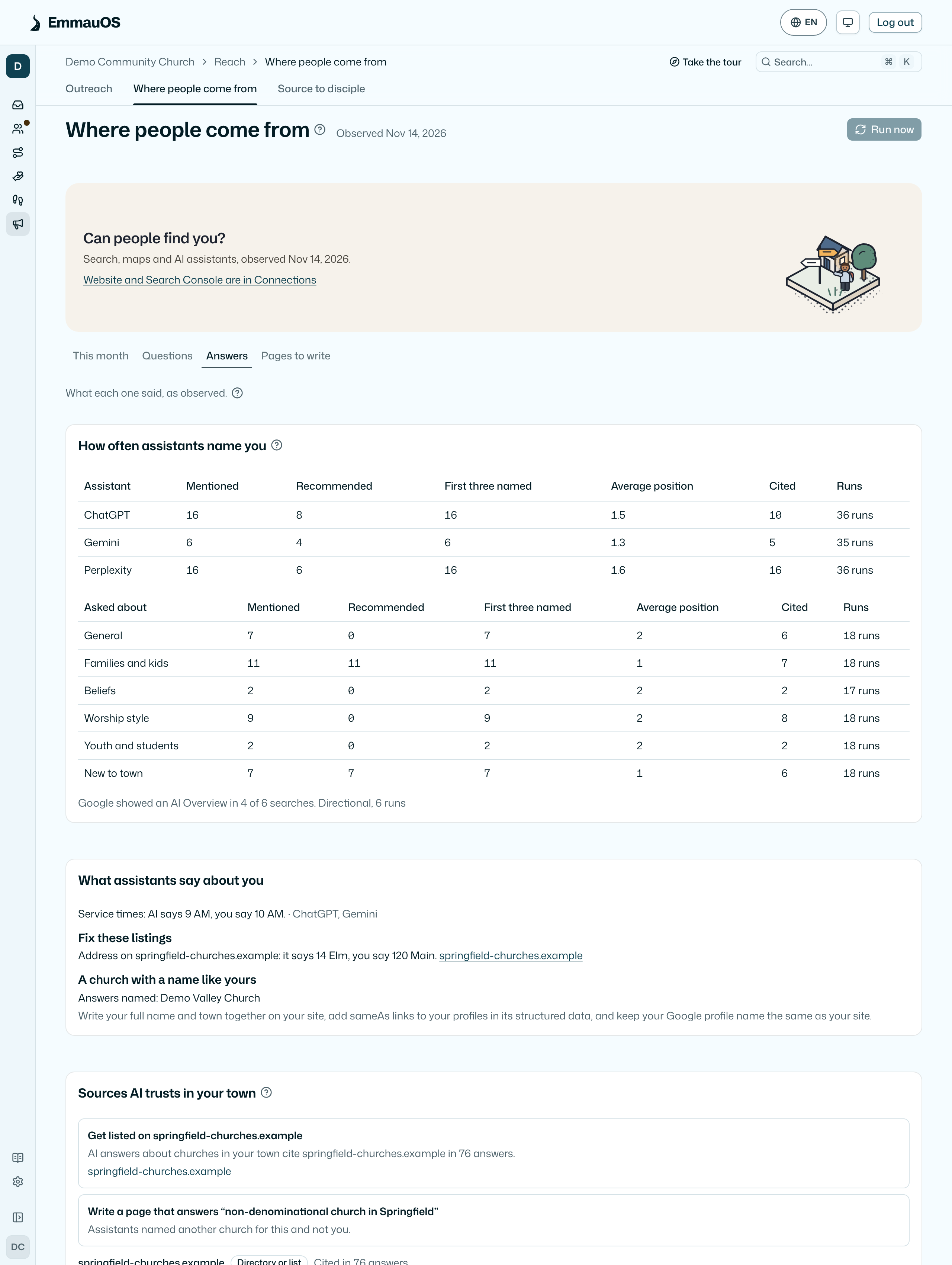
How often assistants name you counts, for each assistant and each kind of question, the runs that mentioned you, recommended you, named you among the first three churches, your average position when named, and the runs that cited your site, each on its own. There is no combined score. Under 10 runs a number says Directional with the number of runs: a direction to check, not a trend.
What assistants say about you compares what the answers say with what you have told EmmauOS, such as "Service times: AI says 9 AM, you say 10 AM." Fix these listings names directory and review pages the answers cite that differ from your times or address. When answers name a church with a name like yours, it says so with the fix: your full name and town together, sameAs links and the same name on your Google profile.
Sources AI trusts in your town lists the sites this month's answers cite most, by type, with up to three next steps such as getting listed on a directory. EmmauOS contacts none of them.
Pages to write
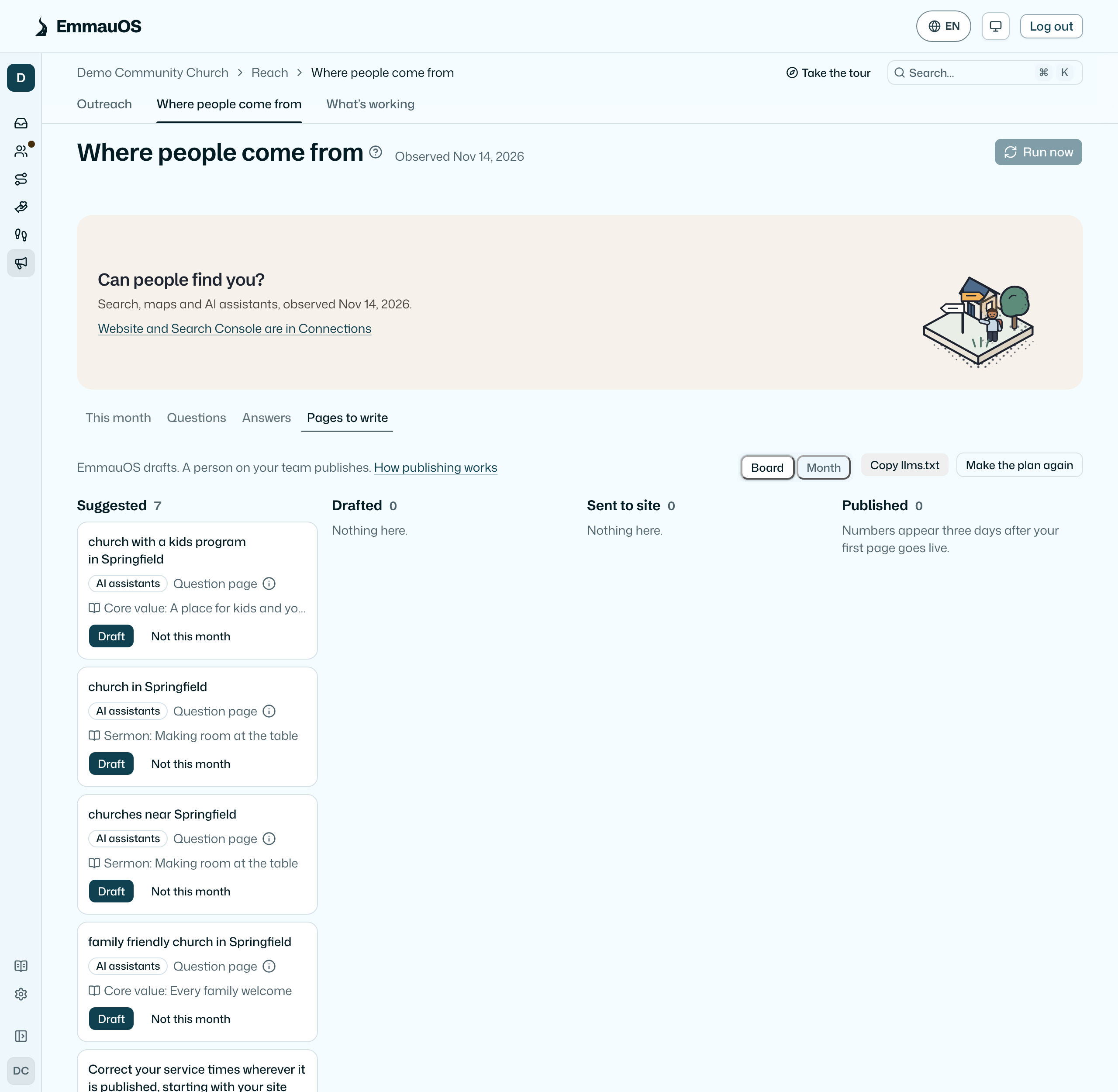
Questions your site does not answer become suggested pages. Make this month's plan picks up to eight, and each one moves from Suggested to Drafted to Sent to site to Published. EmmauOS drafts each page in your church's voice, and a named person on your team publishes it. EmmauOS publishes for you only when an admin has turned on automatic publishing for that kind of page. See Publish to your site.
Pages to write shows as a Board of the four steps or as a Month, with each page on the day it was drafted, sent or published and each Sunday's sermon beside it. Pastors also find this work in Needs you: drafts to check and publish, up to three pages to write, and the first two fixes.
Connections
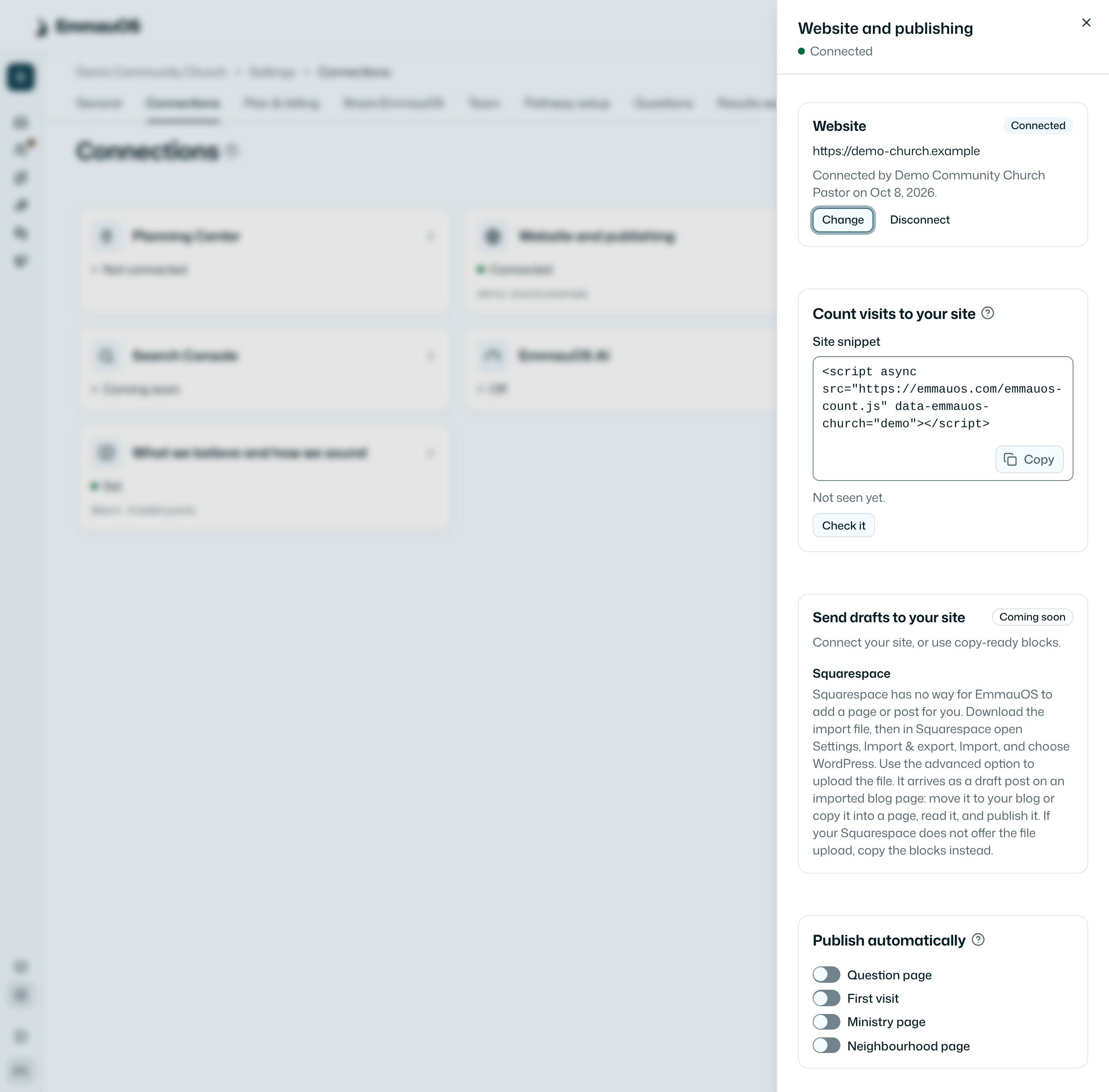
Admins set these on Settings → Connections, in the Website and publishing and Search Console cards:
- Website: the site Be found reads to see which questions your pages already answer. It reads your sitemap and up to 25 pages, and obeys your robots.txt.
- Google Search Console: adds the questions people already search. See Connect Google Search Console.
- Bing Webmaster Tools: connected with an API key from Bing, which is stored encrypted and never shown again. It says Coming soon until it is turned on.
- Your site: connect WordPress, Webflow or Wix so drafts can be sent there as drafts, and choose whether an AI assistant may publish and whether you get an email when drafts are ready. Squarespace has no way in, so it gets an import file instead. See Publish to your site.
- Google Business Profile: a checklist of your listing's name, address, phone and hours, from the latest check. Fix them in Business Profile itself.
- IndexNow: Be found tells search engines about each page you publish on your own site. It first shows the small key file to put at the root of your site, and starts once the file is there.
Disconnecting removes the access and deletes what was read through it.
When it runs
Be found runs by itself once a month while Outreach is on. An admin can press Run now once a week. Every paid plan has a monthly allowance in dollars for Be found: $2 on Small, $3 on Growing and $5 on Large. Each question to a search engine or assistant, each sermon read and each transcription counts at what it really costs. This month shows what is left in plain words, such as "$1.40 of your $3.00 for Be found is left this month." When it is used up, the next run is next month. The first weekly digest after a run tells pastors how many things moved.
What it never does
- It never promises a ranking, a first page or a place in an answer. Search results and assistants change often, so read each line as what was true on its date.
- It never buys ads or links, never asks for reviews in return for anything, and never writes to your listing or your site.
- It reads only public facts about your church. Nothing about the people in EmmauOS goes into it.
- The report is private to your team. It is not listed anywhere.
For AI agents
get-findability-report reads a month's report with what moved, get-gap-list the questions and whether your site answers them, get-ai-answers what each assistant said, get-search-questions the Search Console questions and get-found-connections what is connected. Admins can use run-findability-check. See AI agents.
get-ai-measures reads the measures per assistant and per kind of question with what assistants say about you, get-fix-list the fixes in order, get-trusted-sources the sites answers cite and get-site-checks the checks on your pages.
get-reviews reads your Google reviews and draft-review-reply drafts a reply for a person to post. See Google reviews and your profile.
Try it on your own church
Your assessment link works the minute you sign up. The first 50 people are free, and there is no card to enter.
This page as Markdown, for notes or an AI assistant.