Documentation · Signals and insight
Google reviews and your profile
Be found checks your Google Business Profile is claimed and complete, shows your rating beside nearby churches, drafts replies to your newest reviews, lists people to ask for a review after the moments you choose, and keeps track of your other profiles.
For: PastorAdminOwner
See this screen in the demo church
Where it is
On Reach → Where people come from → This month. Profile health is under Listings in the report, and Google reviews and Your profiles have their own cards. Pastors and up see them; only an admin turns asking for reviews on. Be found is on paid plans.
Profile health
The same Google lookup that checks your listing's name, address, phone and hours also shows these lines, at no extra cost:
- Profile claimed: someone has claimed the profile. If nobody has, anyone can suggest changes to it.
- Listed as a church: the main category, or another one, is a church (or your kind of church). Another category shows as Partly.
- Description on your profile: a description is written.
- Photos on your profile: none, a few, or plenty (ten or more). It is a band, not a count to chase.
- Services and accessibility details: some services or details are set, such as a wheelchair accessible entrance.
- Google reviews: Google's rating and how many reviews you have. Fewer than ten shows as Partly.
A line that is not right joins the fixes, with a link to what to change. You make every change in Google Business Profile yourself: EmmauOS does not connect to it.
Google reviews
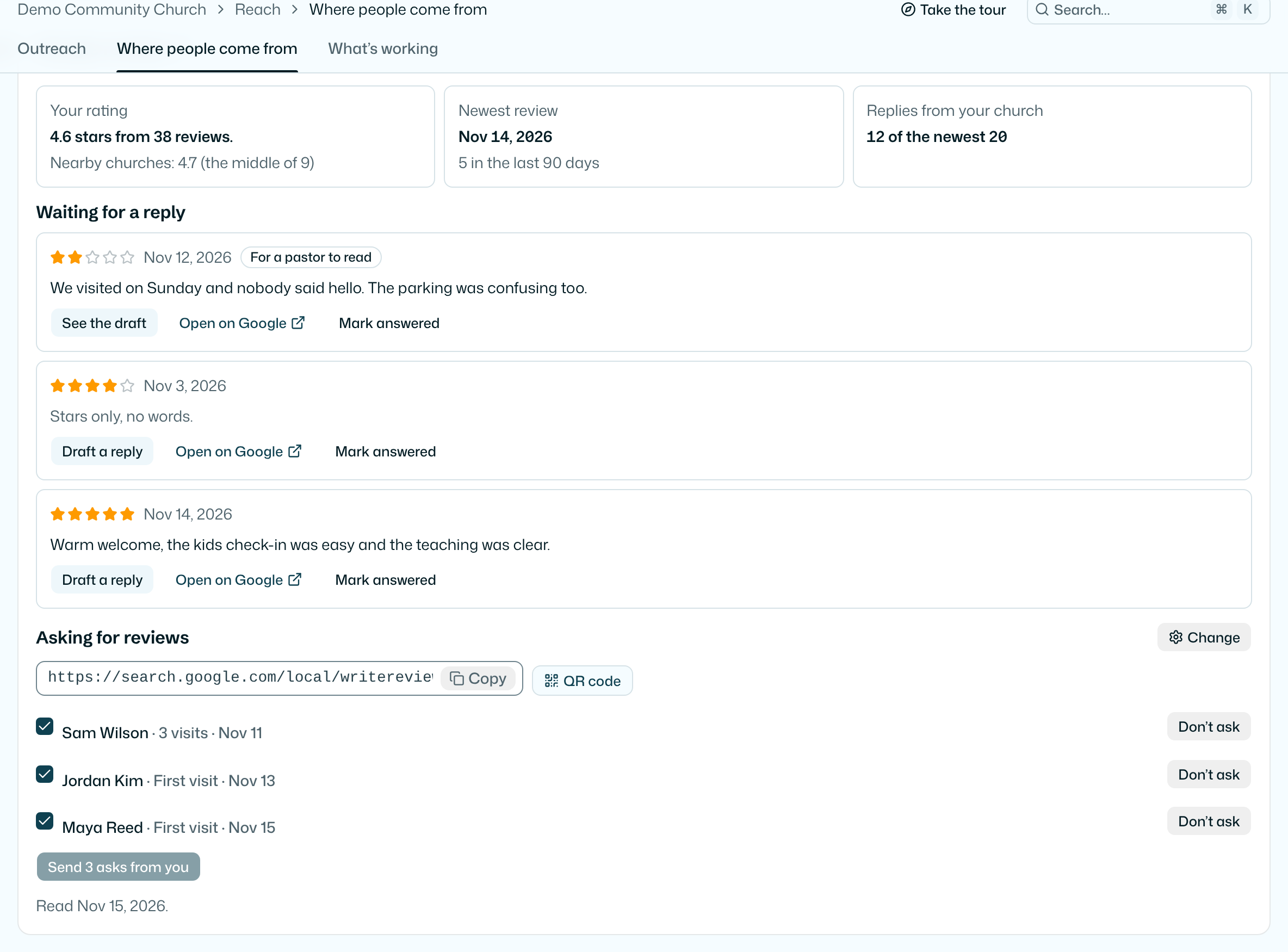
Once a month Be found reads your 20 newest Google reviews. The card shows:
- Your rating, with how many reviews, and the middle rating of the nearby churches seen on Google Maps that month. The middle rating is one number, shown only when at least three nearby churches had a rating. No church is named or ranked.
- Newest review: the date of your newest review, and how many came in the last 90 days.
- Replies from your church: how many of the newest reviews have an answer from your church.
- Waiting for a reply: up to ten reviews with no answer, lowest stars first. One or two stars are marked For a pastor to read.
Replying
Press Draft a reply and your church's AI writes a short reply in your church's voice, in the language of the review. Only the stars and the words of the review go to the AI. It thanks people, owns what went wrong without arguing, and invites them to talk with the team. It never says whether someone attends, never names anyone and never mentions a pastoral situation.
Read the draft, change it, press Copy reply, then Open on Google and post it there yourself. EmmauOS never posts to Google and never contacts a reviewer. Press Mark answered to take a review off the list (Undo puts it back). Reviews you answer on Google leave the list by themselves at the next read.
Drafts count against your church's AI the same as other drafts, and need AI set up in Settings.
Asking for reviews
Your review link opens Google's write-a-review box for your church. Copy it, or press QR code for a slide, a card or the welcome table. Both are there from your first Be found run.
Asking people by email is off until an admin presses Set up asking and turns it on. The admin chooses the moments that make someone ready to be asked:
- Their first visit, from guest check-ins, connect cards and forms.
- A number of visits, from 2 to 20.
- A step on your pathway, such as a class, a number of check-ins or times serving. Only people who finish it after you choose it are asked, never everyone who did it before.
Then how many days to wait after the moment (1 to 14), and your own words for the email if you want them.
Each night, people who reached a moment join the list on the card. Nobody is emailed until a pastor ticks who to ask and presses Send. The email comes from that pastor's name, and replies go to them. It has your words, one Leave a review button and the line "This is the only time we will ask." Don't ask takes someone off the list for good.
- Only adults with an email address, and never someone who asked not to be contacted or unsubscribed.
- Each person is asked once, ever.
- Everyone gets the same ask, whatever they might think. Never ask only happy people, and never offer anything for a review: Google removes reviews that break these rules.
Your profiles
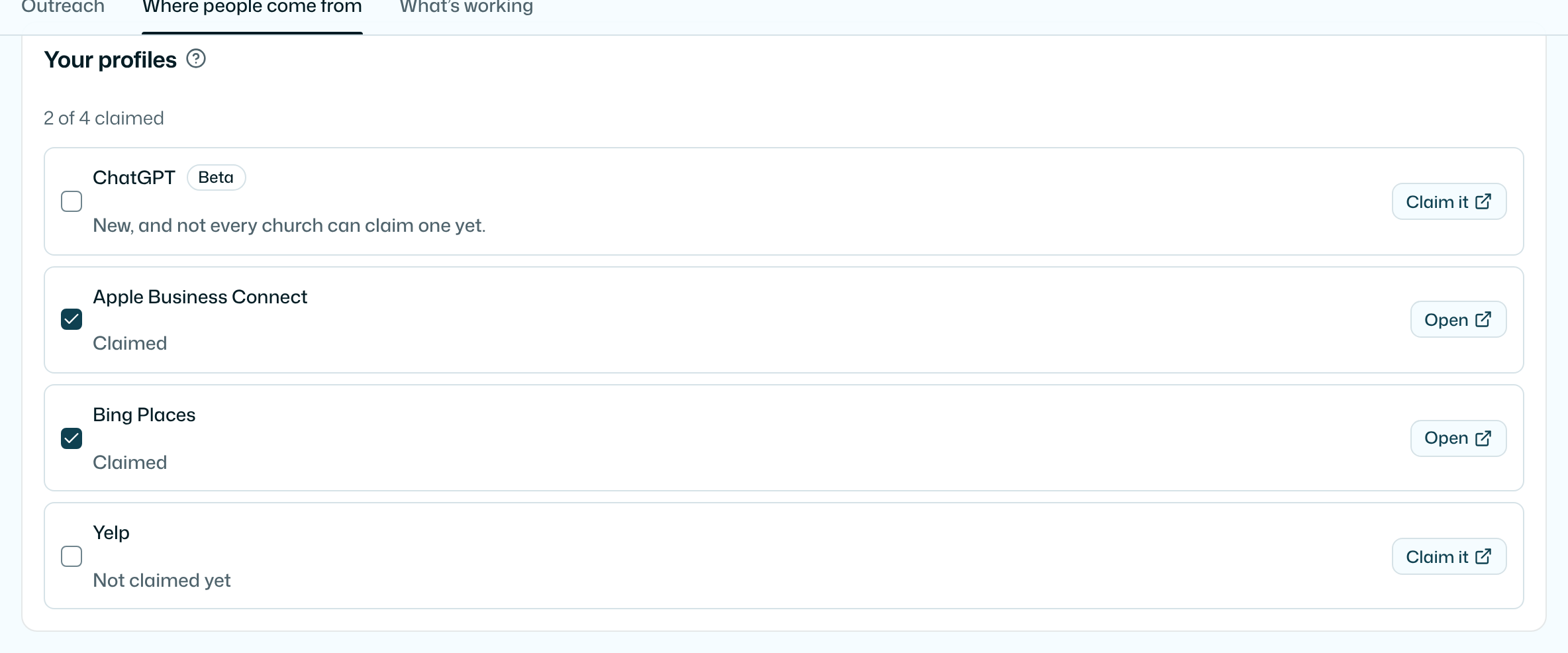
Newcomers and AI assistants read about your church in more places than Google. Your profiles lists the ones worth claiming, with a link to each:
- ChatGPT (beta): ChatGPT has begun letting businesses claim a profile it uses in answers. It is new, and not every church can claim one yet.
- Apple Business Connect: your place on Apple Maps and Siri. The Apple Maps line in your report shows your tick.
- Bing Places: Bing, and the assistants that read Bing.
- Yelp: read by some assistants and maps.
EmmauOS cannot read or change these profiles. Claim each one there, then tick it here. The card keeps who ticked it and when.
What is kept
For each review: the stars, the words, the date, its Google link, whether your church answered, and a draft if you made one. Never the reviewer's name, photo or profile. Review words are deleted 90 days after they were read. For each person on the asking list: the moment that made them ready, and who sent the ask or took them off the list, and when. It is deleted with the person. Each month also keeps your rating, count and the nearby middle rating. Reading 20 reviews costs less than a cent from your monthly Be found allowance.
What it never does
- It never posts a reply, writes to your profile, or contacts a reviewer.
- It never emails anyone to ask for a review on its own. A pastor presses Send.
- It never offers anything for a review, and never asks only happy people.
- It never promises a rating, a ranking or a place on Maps.
For AI agents
get-reviews reads the card: rating, count, the nearby middle rating, the newest review's date, how many were answered, and the reviews waiting for a reply. draft-review-reply drafts a reply to one of them, which a person posts on Google. set-review-asking lets an admin set when people are ready to be asked (an assistant never sends an ask), and set-profile-claimed records a profile your team claimed. Profile health is in get-findability-report under Listings. See AI agents.
Try it on your own church
Your assessment link works the minute you sign up. The first 50 people are free, and there is no card to enter.
This page as Markdown, for notes or an AI assistant.