Documentation · Signals and insight
Sermons, nearby churches and automatic publishing
Be found reads your recent sermons on YouTube or your podcast, shows where you appear beside nearby churches, ties each planned page to a sermon or a value, and can publish clean pages for you once an admin turns that on.
For: PastorAdminOwner
See this screen in the demo church
Where it is
Add your sermons in Settings → Church → Sermons online: a YouTube channel or playlist link, a podcast feed link, or both. Admins set them. What was read shows in Settings → Connections → Website and publishing → Sermons. You and nearby churches is on Be found → This month. Publish automatically is on Settings → Connections. Be found is on paid plans.
Reading your sermons
Each month EmmauOS looks at your four most recent sermons. For YouTube it reads the captions. For a podcast it reads the transcript your feed links, if it has one. Each sermon then shows one of these:
- Read: the words were read.
- No captions: the video has no captions.
- Needs a transcript: the episode is audio only and EmmauOS could not turn it into text. Add a transcript to your podcast feed and it will be read next time.
- Too long to transcribe: the episode is longer than EmmauOS turns into text (about two hours). It is not tried again. Add a transcript to your feed instead.
The words are used three ways. EmmauOS suggests how you sound, as a draft on What we believe for an admin to accept. It writes a few notes on what each sermon was about, with its Bible references. And Draft the week from it opens Sunday to weekday with that sermon.
When an episode has no transcript, EmmauOS can turn its audio into text with an AI model reached through OpenRouter, for episodes up to about two hours. A long episode is sent in pieces of about ten minutes and the words are joined in order. OpenRouter is asked to use only providers that do not keep or train on what they are sent. Only the audio of a public sermon is sent, never anything about a person. The transcript itself is not kept. EmmauOS keeps the title, the link, the date, the notes and the references. Reading captions and turning audio into text count against your Be found allowance at what they cost; when it is used up, the rest wait until next month. Read now reads new sermons straight away.
You and nearby churches
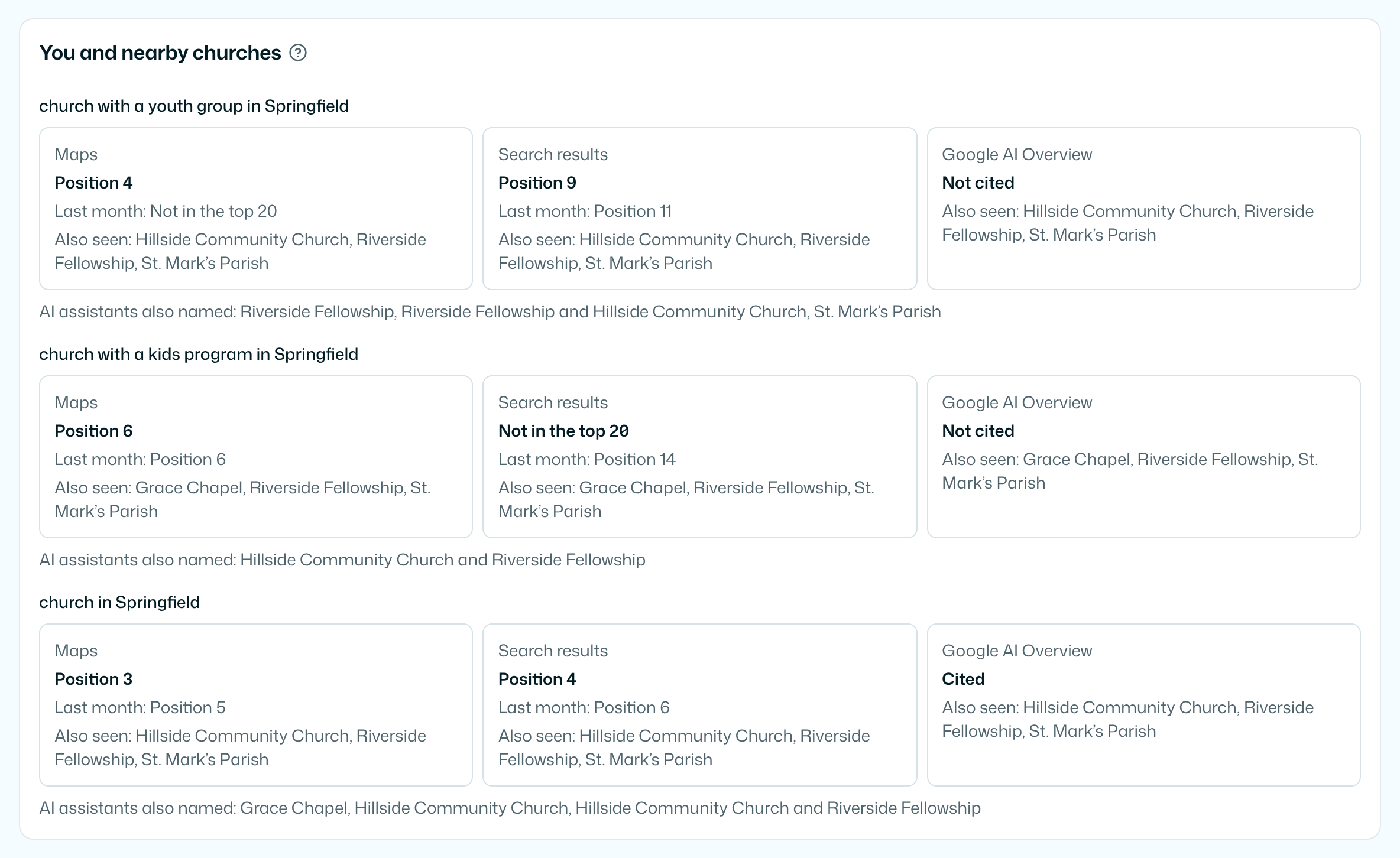
For each newcomer question, such as "church in Springfield", you see where your church appears this month and last month:
- On Maps: your position in the top 20, or Not in the top 20.
- In Search results: the same.
- In Google AI Overview: whether the overview cites your site.
Under each one are the other churches seen there, by name and in alphabetical order. They are other churches near you, as each place showed them. This is not a ranking of churches and there is no score. Who each AI assistant named is on the Answers tab.
Questions from Google's People also ask join your question list.
Values and the plan
Under What we believe, add up to eight Core values beside your belief points. Every draft keeps them in mind.
When you make the month's plan, each suggested page names three things: the question people ask, the channel it serves, and From: the recent sermon or the value it grows from. The draft is written in your voice and links to that sermon. How much people search for a question is shown as Low, Some or Steady, never as a number.
Publish automatically
Off unless an admin turns it on. Each kind of page has its own switch: question page, first visit, ministry page and neighbourhood page. When one is on, a page EmmauOS has just drafted is published on your connected site only if:
- its Check before publishing list is empty,
- your church has an accepted voice, and nobody said the page does not sound like you,
- it is a new page, not a change to a page that is already live.
The content ledger records the page as published automatically, under the name of the admin who turned the switch on. Anything flagged waits for a person, as before. Pages for children and about what you believe always carry a check, so they always wait. If the admin who turned it on is no longer an admin, pages wait until another admin turns it on again.
Through your AI assistant
get-sermon-archive lists the sermons read. set-sermon-archive sets where they are and can read them now. get-nearby-churches shows where you appear beside nearby churches. set-auto-publish turns automatic publishing on or off for one kind of page, for admins. See AI agents.
Try it on your own church
Your assessment link works the minute you sign up. The first 50 people are free, and there is no card to enter.
This page as Markdown, for notes or an AI assistant.