Documentation · Getting started
Needs you
Where Today opens: one list of who is waiting on you, with the person you choose opened beside it.
For: LeaderPastorAdminOwner
See this screen in the demo church
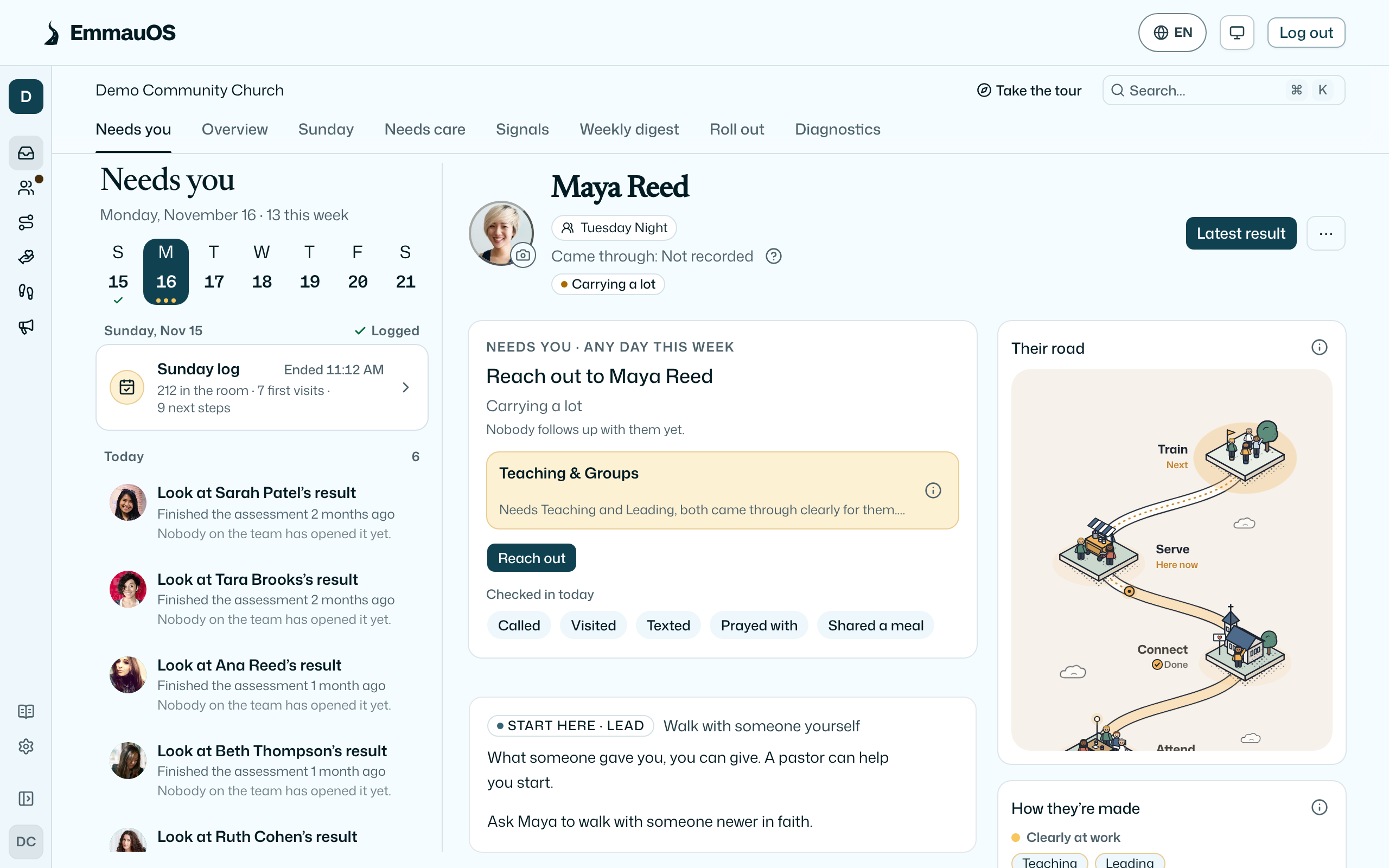
Today opens on Needs you. It reads the lists EmmauOS already keeps and shows them as one queue. Each row says what to do in a few words (Reply to Daniel, Check in with Ruth) and how long is left. The rows come from:
- Replies waiting: conversations on your reply clock, once Replies is on.
- Guests: first-time guests whose clock is running or late (Guests and first visits).
- Outreach: people on the Outreach track on the day they wait for you, with the next stage named.
- Saturday’s notes: guests who planned a visit and asked for a hello, two days before they come (Plan a visit).
- Check-ins due: people on your care lists due today or late.
- Care: people who may be drifting or carrying a lot. Care at the top of Today shows only them, with Reach out and Set aside.
- Waiting for a first look: results nobody on the team has opened yet.
- Drafts to publish: for pastors, Sunday to weekday drafts, and page drafts ready to check and publish once Reach is on.
- Be found: for pastors once Reach is on, a few pages to write and fixes from the findability check.
- Leadership observations: a round you sent, once someone has answered since you last read it (Leadership observations).
- Help offers: helpers who offered on a help calendar you coordinate, waiting for your answer.
The week
A strip across the top shows this week, Sunday to Saturday, at your church's time. A dot under a day is something on it; Sunday has a tick once the Sunday log is in. Sunday opens the week: its card sits above the rows, with who was in the room, first visits and next steps once the Sunday log is in, or a way in to log it. Today's rows come first, then outreach and check-ins due later this week under their own day, then care flags and drafts under Any day this week. Choose a day to see only that day. A day with nothing on it says so, and nothing is ever marked missed.
This week
This week sits beside Needs you at the top of Today, one tap away. It reads the same week the way the church lives it: Last Sunday in counts from the Sunday log, then today and the six days after, each with who needs you that day and what the church holds on it, then Any day this week and Coming up. Coming up lists Planning Center events and service plans, read every few hours, and the practices your church has dated. A row about someone opens them with the one thing to do on top, as the list does. Quiet days in a row fold into one line. The iPhone and Android apps show the same view behind the same switch.
First week
For a new church, Your first week sits above the list for admins: the first five steps of the Roll out plan, one a day. Bring in your people, write your path, invite your team, put the QR on Sunday’s slides, and your first results. While setup is unfinished, the first step is Finish setting up, which opens onboarding where you left it. On the Free plan the card sits at the top of People instead. The first step not done is the one button. The card leaves once the steps are done, and Hide for now puts it away for the whole church; See the whole list opens Roll out, which keeps every step.
The porch
Beside the list sits the porch: a greeting, and how the church is doing in counts only. The last 90 days shows how many came back a second time, served for the first time and joined a group. Any line under five is left out and counted as kept quiet, so no one can be picked out. Last Sunday shows who was in the room, first visits and next steps from the Sunday log, and who logged it. Leaders and up see it; it never names anyone. Beside it, This week lists what the church holds on the days ahead, from its calendar and dated practices.
Beside the list
Choose a row and that person's page opens beside the list. What to do sits on top, with a team that fits when there is one, then their road, how they're made in bands, follow-up and timeline. The button opens the screen where it is done. On a phone the person opens in place of the list, and Needs you at the top takes you back. A draft, a page to write or a fix opens as a task beside the list.
The church's work
Some rows are about the church, not one person. A draft opens as a task beside the list: its first lines, what to check, and where it will go. Tick each check, then Publish as you. A box names the page and its address first, and your name is recorded as the person who published it. Nothing publishes on its own unless an admin turned on automatic publishing. A page to write offers Write the draft, Draft a page or Add to the plan, and a fix offers Done, which you can undo. The iPhone and Android apps open the same task, so you can publish from your phone.
On the row
Most rows carry their one thing to do, so you can do it without leaving the list: I reached out for a guest, Move to the next stage (or They came) for someone on the Outreach track, and Log with the five care notes for a check-in. A care flag's title already says what to do, so its Reach out is on the person's card beside the list, with the rest: Assign to me for a guest nobody follows up yet, Not now, and the care notes as chips. A note and Not now can be undone for a few moments. The iPhone and Android apps show the same week and do the same things from the person's page.
Finding your way
The places sit in a rail at the side: Today, People, Path, Serve, Walking, and Reach once outreach is on, with Resources and Settings at the foot. Point at an icon for its name. Show labels at the foot of the rail shows every name and the pages under each place, and EmmauOS remembers your choice on this browser. With labels hidden, a place's pages are tabs above the page. ⌘K (Ctrl+K) still finds any page or person, and Ask AI is in the corner. Today has three tabs: Needs you, the Overview and Sunday.
On the person
Under each row's title a quiet line says why it is here: They asked a question on your visit page, A first visit starts a 24-hour clock, Helpers offered. Confirming sends them the address.
A conversation lives on the person. A reply row opens their page with the conversation on it and the box to answer docked under it, so the rest of their story is in view while you write. Draft with AI fills the box and never sends, and Text shows you the exact words to confirm first. When they asked for a hello, Someone to meet sits beside the conversation. A family you are helping shows the helpers' offers on their page, with Confirm and Decline. Write Saturday’s note puts a draft in their conversation, and nothing goes until you press Send. Replies still lists every conversation.
This season
While a dated practice runs for the whole church, it sits under the week as one line: This season · Day 8 of 21. Point at it for the share of people on My Path who kept it this week. Under five people it shows no share, and it never shows who kept it. See Reading plans and dated practices.
A scope for each job
When you have more than one job, a badge at the top of the rail names the one you are in. Choose it to switch: the whole church, its student ministry, a plant's Launch home or a network. Each opens a short home with only the places that job needs, and a band under the bar says what that scope can see. The badge offers only what your role already lets you open, and a scope with nothing behind it does not appear. In the apps the same badge sits above Needs you.
Who sees what
- Leaders and up see the list. Most rows are people you follow up with; pastors and up also see people nobody follows up with yet.
- Viewers see an empty list. The Overview has the counts.
- Nothing here contacts anyone. Each button opens a screen in EmmauOS, and a person on your team does the rest.
Try it on your own church
Your assessment link works the minute you sign up. The first 50 people are free, and there is no card to enter.
This page as Markdown, for notes or an AI assistant.