Documentation · Resources
Resources
A reading list your pastors curate, tagged by gift and topic, suggested on a person's page and listed on your public directory. Add a shelf of books from one photo.
For: PastorAdminOwner
See this screen in the demo church
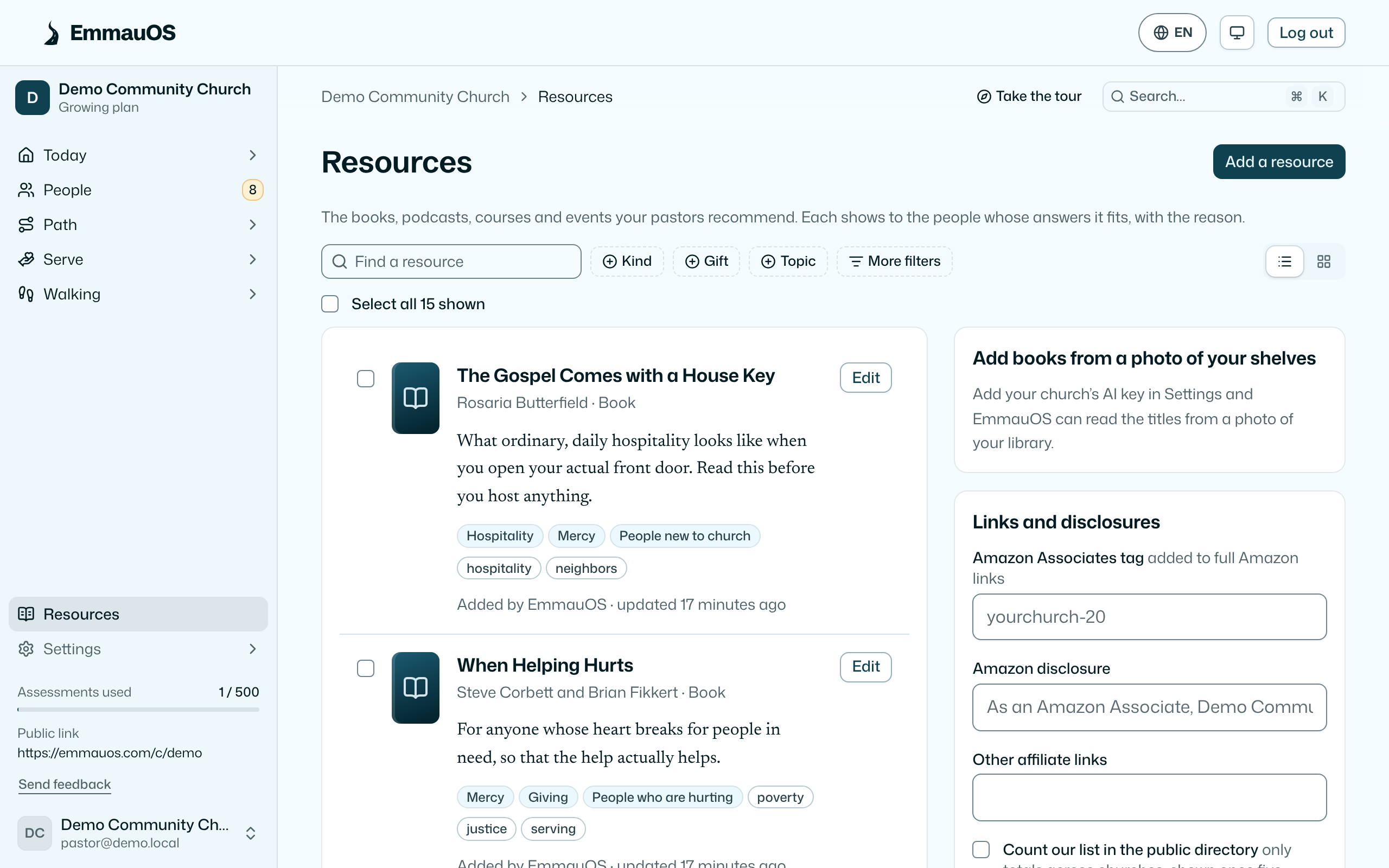
What a resource is
A book, podcast, conference, event, course or class, article, video or anything else with a link, with the gifts and topics it is good for and a pastor's note: one or two sentences in your voice about why you recommend it. A book is looked up by title or ISBN so its cover and details fill themselves in.
Kinds
Add a resource starts with What is it?: pick the kind first. Conferences, events and courses or classes also take a start date, an end date and a place, and drop to "Past events" once they're over. Every other kind stays on the list until you remove it.
The Kind filter always lists all eight kinds, with how many of each you have, so a list that's all books still shows what else it can hold. Each row says its kind, and so does each card in the grid (books leave it off, since the cover says it). The public directory, a person's page and AI agents all see the same kinds. Photos of a shelf only ever add books.
Filling a gap
The Overview's Where people want to grow compares what people want to grow in with your resources. Its Add a class button opens Add a resource as a course or class, with that area already in Growth topics.
Adding a shelf at once
Add from a photo takes a picture of a bookshelf, reads the spines, and offers each title to add, with cover and details found for you. Check the list, uncheck the ones that aren't yours, add. Most churches' first twenty resources arrive this way.
Where resources appear
- On a person's page, the ones tagged for their lead gifts, to suggest in a conversation. Suggesting one is logged.
- On the result page a member sees, if you choose, as "a few things our pastors recommend".
- On your public directory at
/resources, a page in your colors listing what your church recommends, grouped by gift.
Ways to grow
A resource can point people to it from a role or a pathway step: a class, an online course, a conference, a welcome lunch sign-up. EmmauOS links out to it. It doesn't run the class, take sign-ups or track progress.
- From the resource: in its form, Point people here from lists your roles and every step on your pathway. Pick as many as fit.
- From a role: on the role's page, Ways to grow into it lists what's linked, and pastors can change it there.
- From a step: in Pathway setup, open a step and use Resources for this step. A step needs to be saved before you can link to it. Links aren't part of a pathway version, so saving or restoring a version never changes them.
Where they show:
| Linked from | Who sees it | Where |
|---|---|---|
| A pathway step | The person on that step | Under their next step on My Path |
| A pathway step | Your team | Under "Start here" on the person's page |
| A role | Your team only | The role's page, and "Growing toward" on a person's page |
A person sees a step's resources only when they're published, for everyone and not on the disciplers' shelf. Past events and drafts never show. Role links never reach the person a role is about, so nothing tells them they're being considered. A step or a role shows up to six resources, in the order you picked them.
Amazon links and opens
A book can carry a link to buy it. If your church has an Amazon Associates tag, Settings lets you add it and the disclosure required with it appears on every page that uses it. EmmauOS counts how many times each resource was opened, so you can see which recommendations land; it never records who opened what.
Who sees what
Pastors, admins and the owner curate the list. Leaders see it when suggesting. Members see what you chose to show them.
Suggested by someone walking with another
Someone walking with another can suggest a link for your shelf from their guide. It waits under "Suggested for the shelf" on Walking with; "Add to the shelf" opens this page's form with the link filled in, and saving it thanks the sender. Who sent it is never shown. See Walking with.
For people walking with someone
Check "For people walking with someone" on a resource to put it on the disciplers' shelf. It then appears only to someone walking with another person, at the end of their guide and on their My Path. It is never matched to a result, never shown in the public directory or to an AI agent, and its link isn't opened through EmmauOS, so it can't be quoted either. Uncheck it to make it an ordinary resource again.
Try it on your own church
Your assessment link works the minute you sign up. The first 50 people are free, and there is no card to enter.
This page as Markdown, for notes or an AI assistant.