Documentation · Ministries and placement
Apprentices
Name who is learning each role from the person who holds it, such as a co-leader who will take a group over or start the next one. See which leaders have nobody learning from them, and count the groups and teams that multiplied.
For: LeaderPastorAdminOwner
See this screen in the demo church
An apprentice is someone learning a specific role from the person who holds it. A co-leader who will take a group over or start the next one is the most common example. Someone learning to lead a serving team alongside its lead is another.
An apprentice is not the same as discipling. Walking with someone is about their whole life with God, and it lives in Walking with and Generations. An apprentice is about one role.
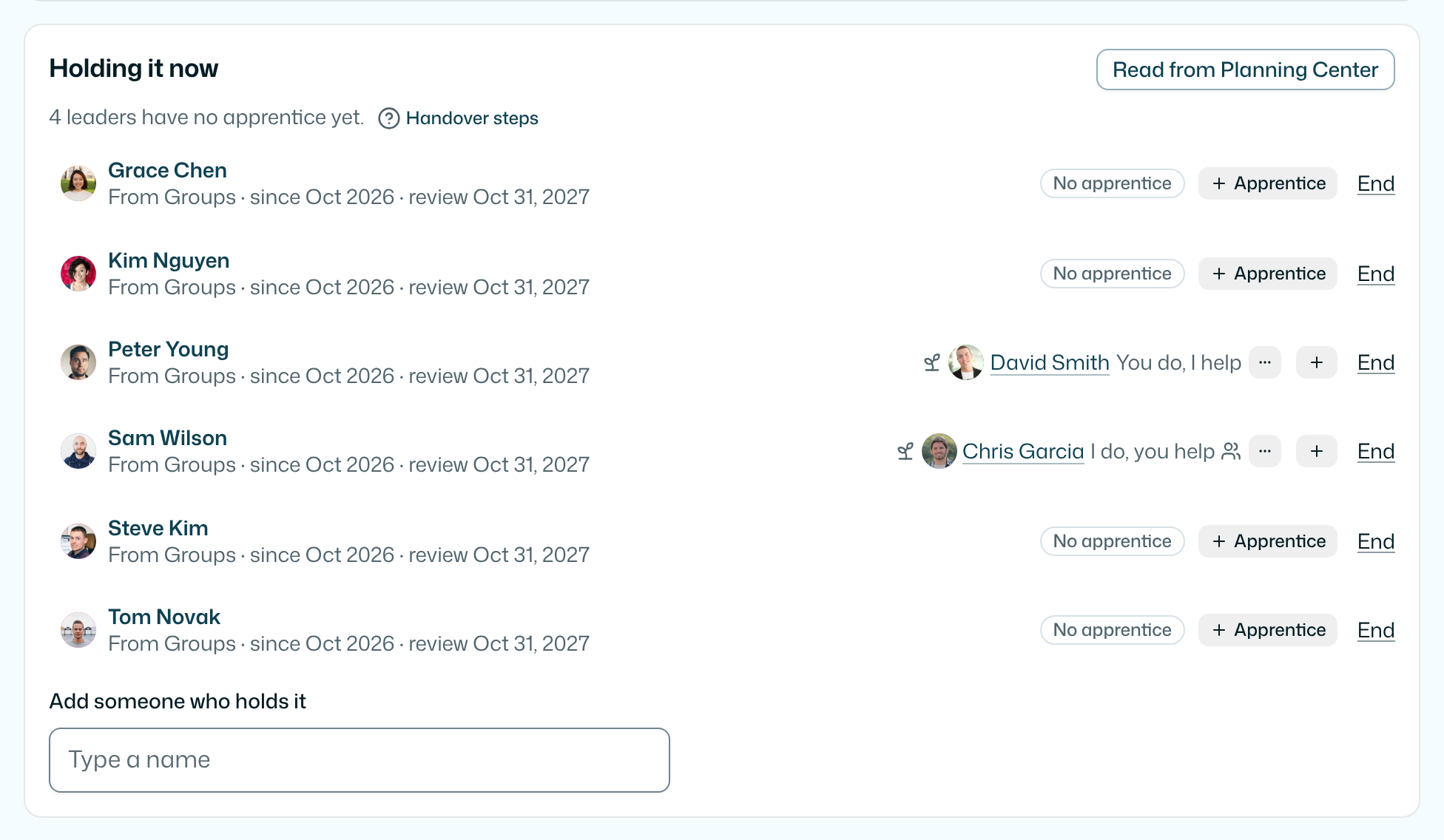
Naming an apprentice
Open a role from Roles and go to Holding it now. Next to each person who holds the role:
- + Apprentice opens a search. Type a name and pick the person. They are now learning the role from that leader.
- A leader with nobody learning from them shows No apprentice.
- A leader can have more than one apprentice. Use + again to add another.
Anyone on your team who can see the role can name an apprentice. A leader sees only the roles opened to leaders. Someone under 18 can't be named. Neither can the leader themselves.
Four handover steps
Each apprentice moves through four steps: I do, you watch, I do, you help, You do, I help and You do, I watch. Set the step from the ⋯ next to the apprentice, under Handover. Anyone on your team who can see the role can move it.
The names are your church's to change. A pastor can rename them with Handover steps under Holding it now. They are the same four for every role, and leaving one empty goes back to the usual names.
Opening it to the leader and the apprentice
Until a pastor opens it, an apprenticeship is for your team only. Once a pastor has talked with both people, they tick We’ve talked with both in the ⋯ menu. From then on:
- The leader sees Raising up Jo on their My Path, with the role and the four steps, and moves the step with Next step or Back a step.
- The apprentice sees You’re learning from Jim, with the role and the same steps.
- Each sees the other's first name and nothing else from Roles.
Unticking it closes it again. It also closes on its own when the learning ends or the leader steps down. Both people need to be on your list first.
The leader can also ask for one short email a month about the person they're raising up: where the handover is and one thing to try at that step. Only the leader is emailed, only after they ask on their own My Path, and one tap stops it. When someone they raised up starts a new one, their My Path shows it under Groups that came from yours.
Which leaders have nobody yet
On Roles, each role's row says how many of its leaders have no apprentice, for example 3 leaders with no apprentice. The link opens the role's Holding it now, where each of those leaders is marked.
When the learning ends
The ⋯ next to an apprentice says how it ended:
- Started a new one: they lead a new group or team of their own. This is what the Overview counts as multiplied.
- Took it over: they lead the group or team they learned in, and the person who led it stepped down.
- Stepped back: they are no longer learning it.
When a pastor marks Started a new one or Took it over, the apprentice is added as someone who holds the role. Taking it over also ends the leader's hand-entered row. A leader's word is kept too, but who holds a role stays with pastors and with Planning Center.
EmmauOS also notices on its own. When an apprentice comes to hold the role, by hand or from Planning Center, the learning ends: Started a new one if their leader still holds it, Took it over if not. Planning Center often lists a co-leader as a leader of the same group. That still counts as learning. It becomes Started a new one once Planning Center shows them leading a group their leader doesn't lead.
If a leader steps down while someone is still learning from them, the apprentice stays on the role's page under Learning it, their leader has stepped down, so nobody is lost.
Multiplied on the Overview
The Overview's Multiplied vital sign counts the groups and teams an apprentice started in the last 12 months, across the roles you can see. Its link says how many leaders have no apprentice yet and opens Roles. The reading shows up once a role you can see has someone holding it.
An apprentice at the last step is ready to launch. When anyone is, the Multiplied link says how many, for example 1 apprentice ready to launch, so you can talk with them about starting a new one.
For your AI
get-role lists each apprentice, who they are learning from, and the leaders with no apprentice. list-roles counts them for each role.
Each apprentice also comes with their handover step and whether it is open to both people.
What stays private
- Apprentices are for your team only, like everything on Roles, until a pastor ticks We’ve talked with both. Then only the leader and the apprentice see it, each on their own My Path. Nothing about it is written to Planning Center.
- EmmauOS sends nothing to anyone when you name an apprentice or say how it ended.
- There is no score on anyone. Multiplied counts groups and teams, not people, and nobody is ranked by how many they trained.
- The only email is the monthly check-in a leader asks for themselves. It says where the handover is, never how anyone is doing.
Try it on your own church
Your assessment link works the minute you sign up. The first 50 people are free, and there is no card to enter.
This page as Markdown, for notes or an AI assistant.